ORIVEILUNOFFICIAL
VALORANT fan tool · Windows

ORIVEIL

Get better after every match.

Review your own post-match data to track growth, plan compositions with your team, run a friend league and build a streaming overlay — in one desktop app. Your data stays on your PC.

v1.1.1FreeRiot API approval pending
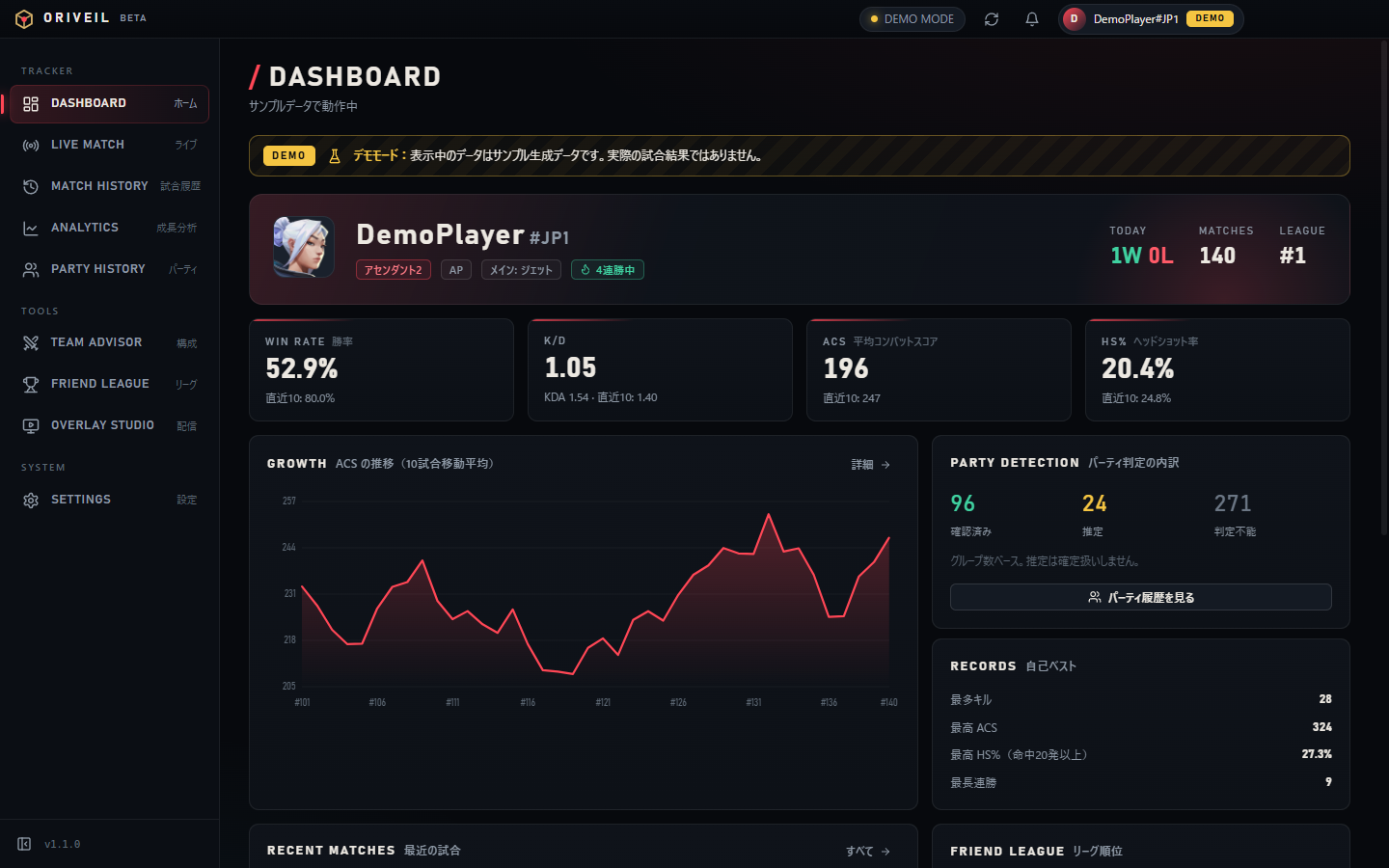
Dashboard: win rate, K/D, ACS, HS% and growth trend
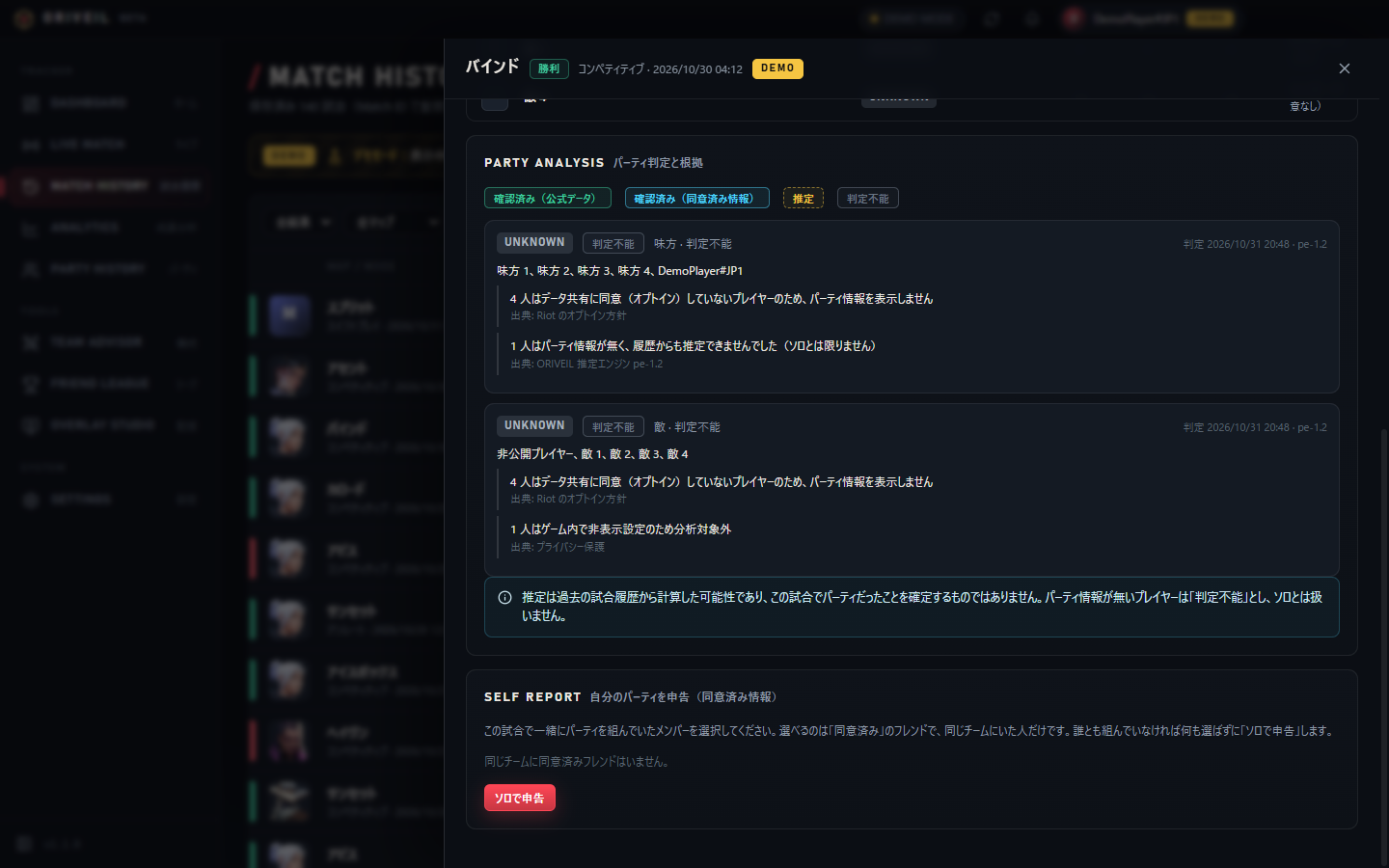
Party evidence, source and confidence (estimates are never shown as confirmed)
!
Current status
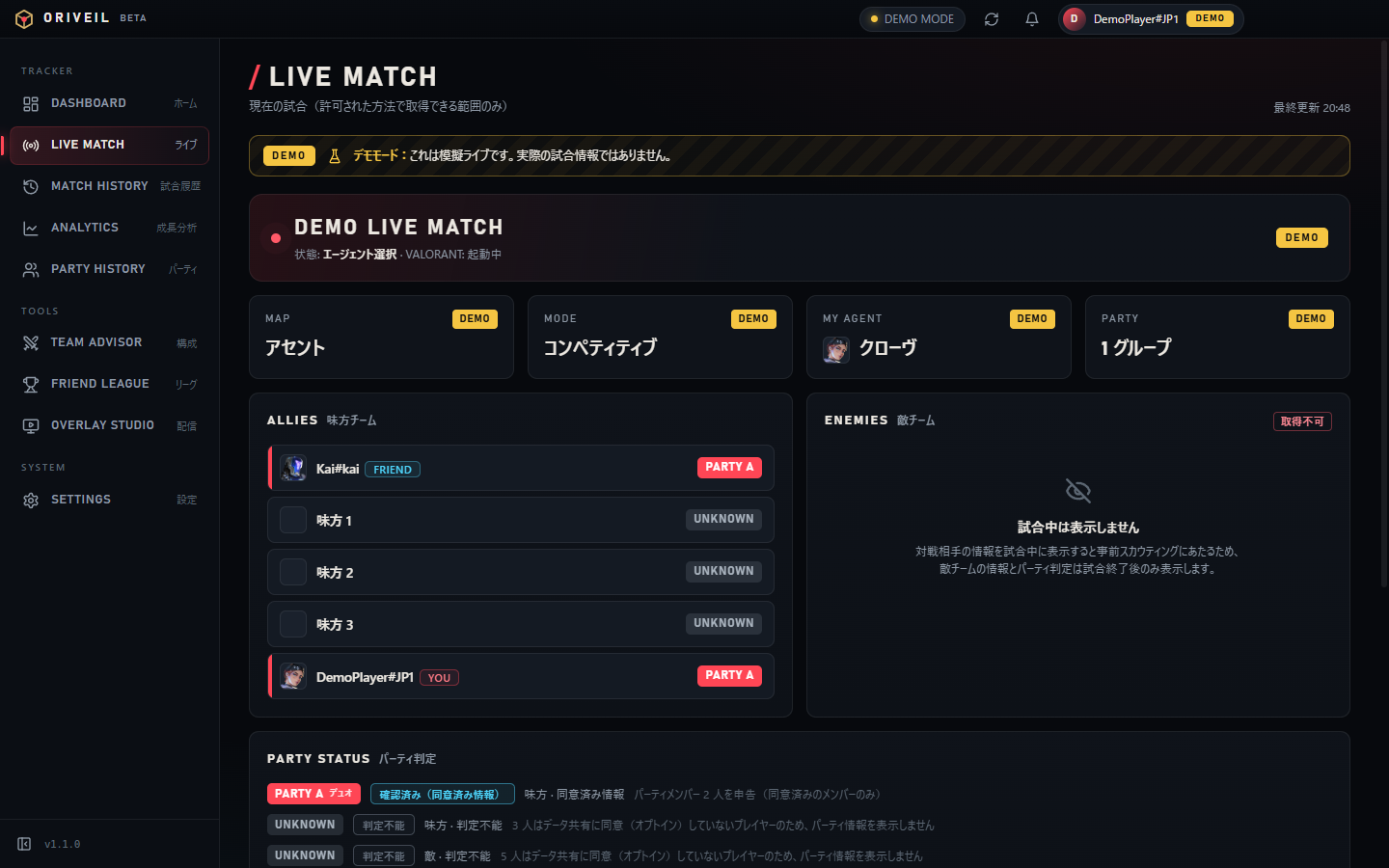
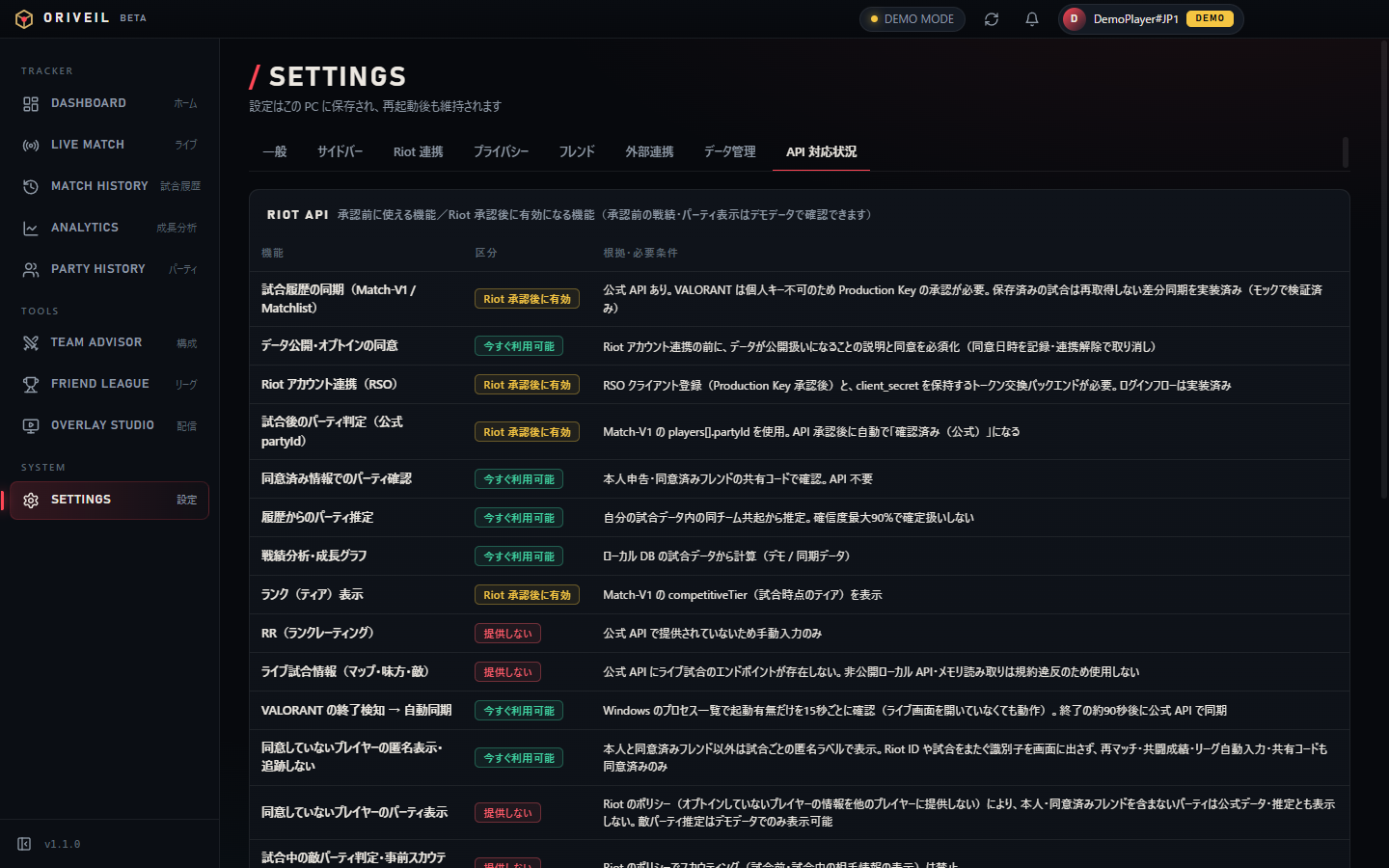
Riot account linking (Riot Sign On) and match data from the official API will be enabled only after Riot Games approves our Production API key. Until then the app runs in Demo Mode with sample data that is labeled “DEMO” on screen. All screenshots on this site show demo data.
Availability

Available now vs. after approval

FeatureStatus
Try every feature in Demo Mode (sample data labeled “DEMO”)Available now
Team composition advisor (suggest, save, compare)Available now
Friend league (manual reports, approval, audit log, sharing standings)Available now
OBS overlay (manual mode, or demo data)Available now
Friend registration & consent management, self-reported party infoAvailable now
Riot account linking (Riot Sign On, opt-in)After Riot approval
Syncing your own match history and analytics on real dataAfter Riot approval
Party confirmation from official data (partyId)After Riot approval
Auto-sync after VALORANT closes, league auto-fill, overlay auto data (real data)After Riot approval
Live in-match data, pre-match opponent information (scouting)Not offered (no official API / not allowed)
Features

Four core features

01

Growth Analytics

Win rate, K/D, KDA, ACS and HS% are computed from your own post-match data with documented formulas — with last 10/20/50 games, period comparison and best/worst agents and maps.

  • Growth chart: 10-game moving average of ACS, K/D, win rate, HS%
  • Transparent party status in 4 levels: confirmed (official data) / confirmed (consented info) / estimated / unknown
  • Estimates are never treated as facts: evidence, source and confidence (max 90%) are shown; missing data is never assumed to be solo
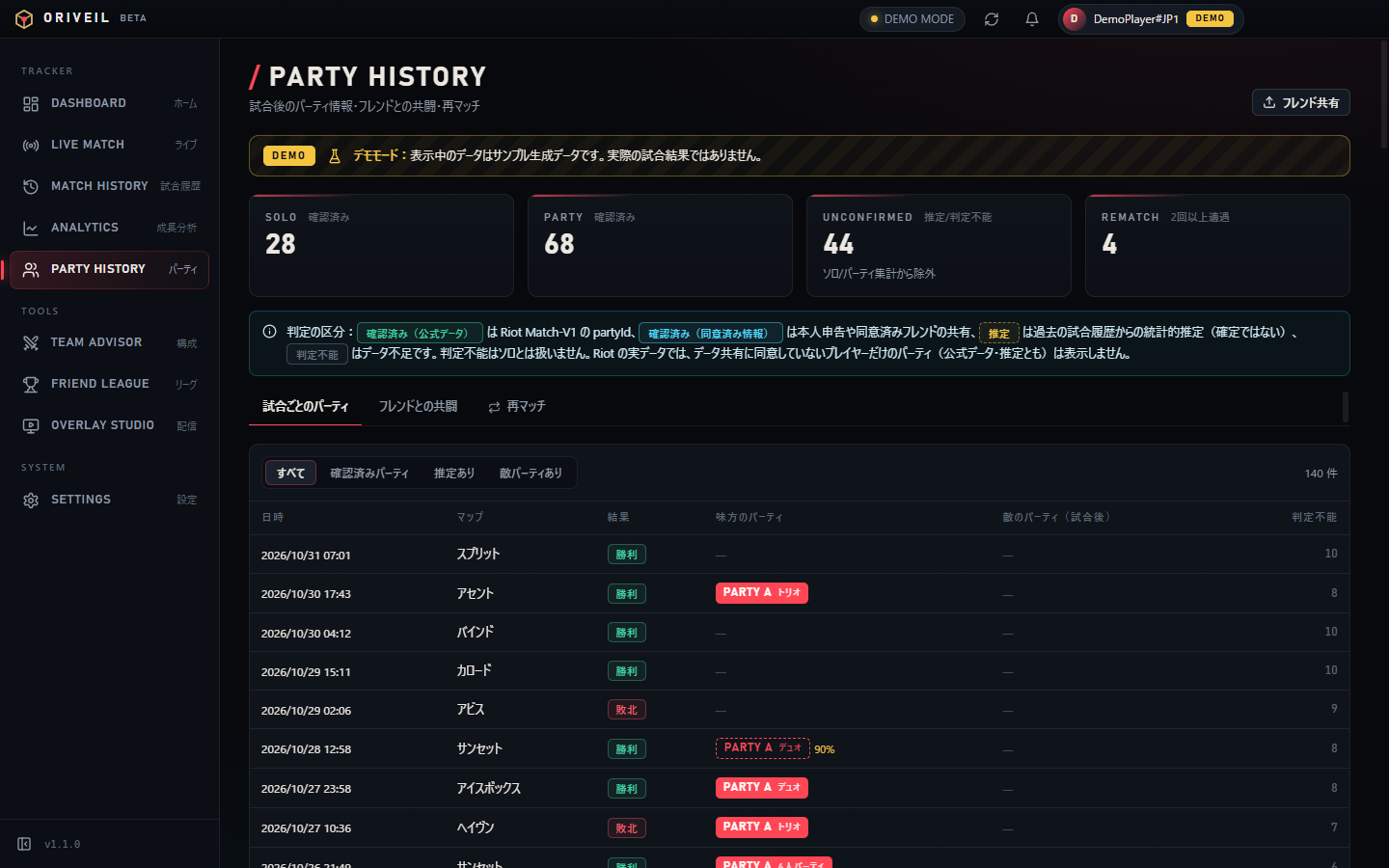
  • Solo vs party, results and rematches with consenting friends (players who have not opted in are never tracked)
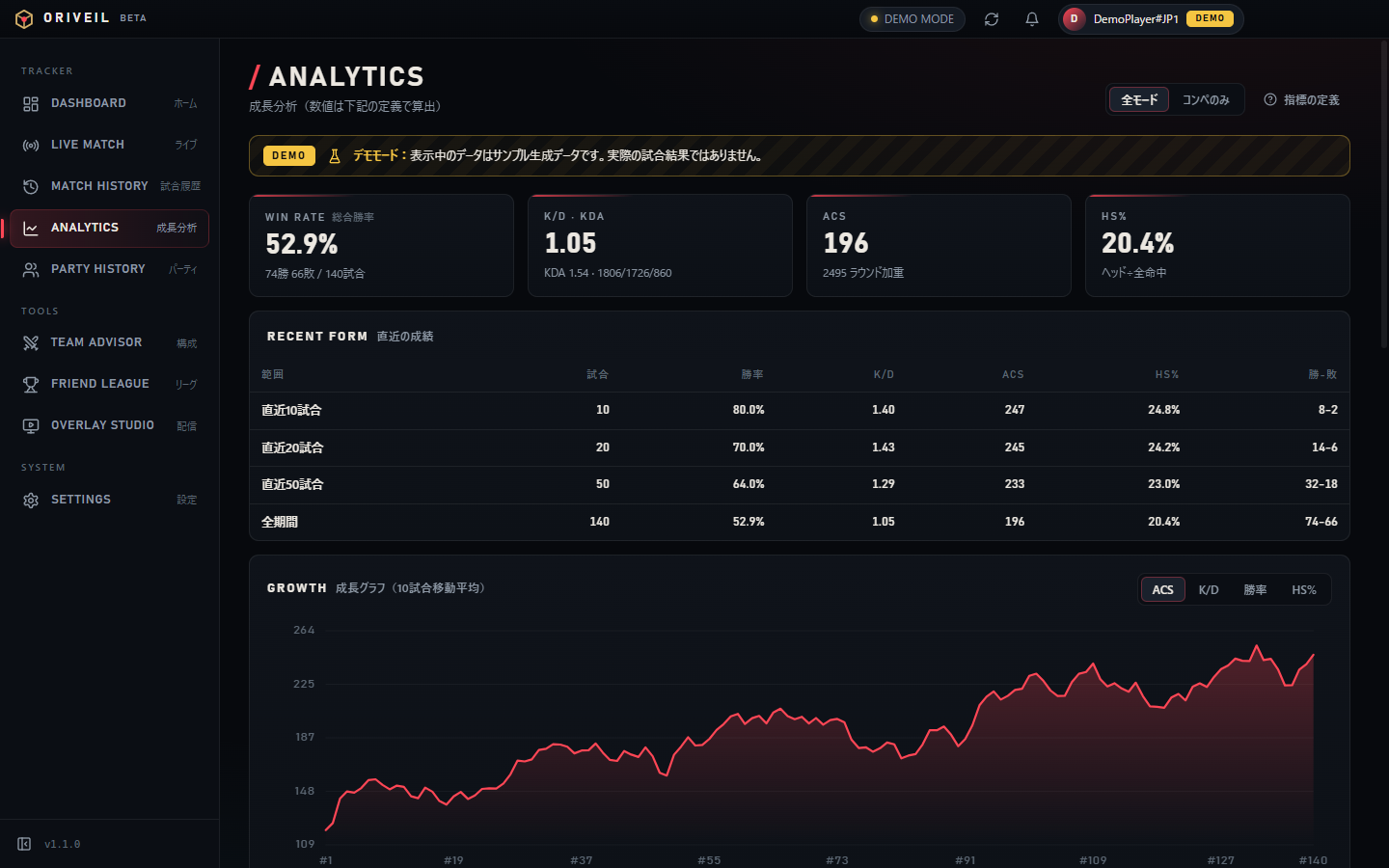
Analytics: last 10/20/50, period comparison, per agent / map
Analytics: last 10/20/50, period comparison, per agent / map · UI in Japanese · DEMO
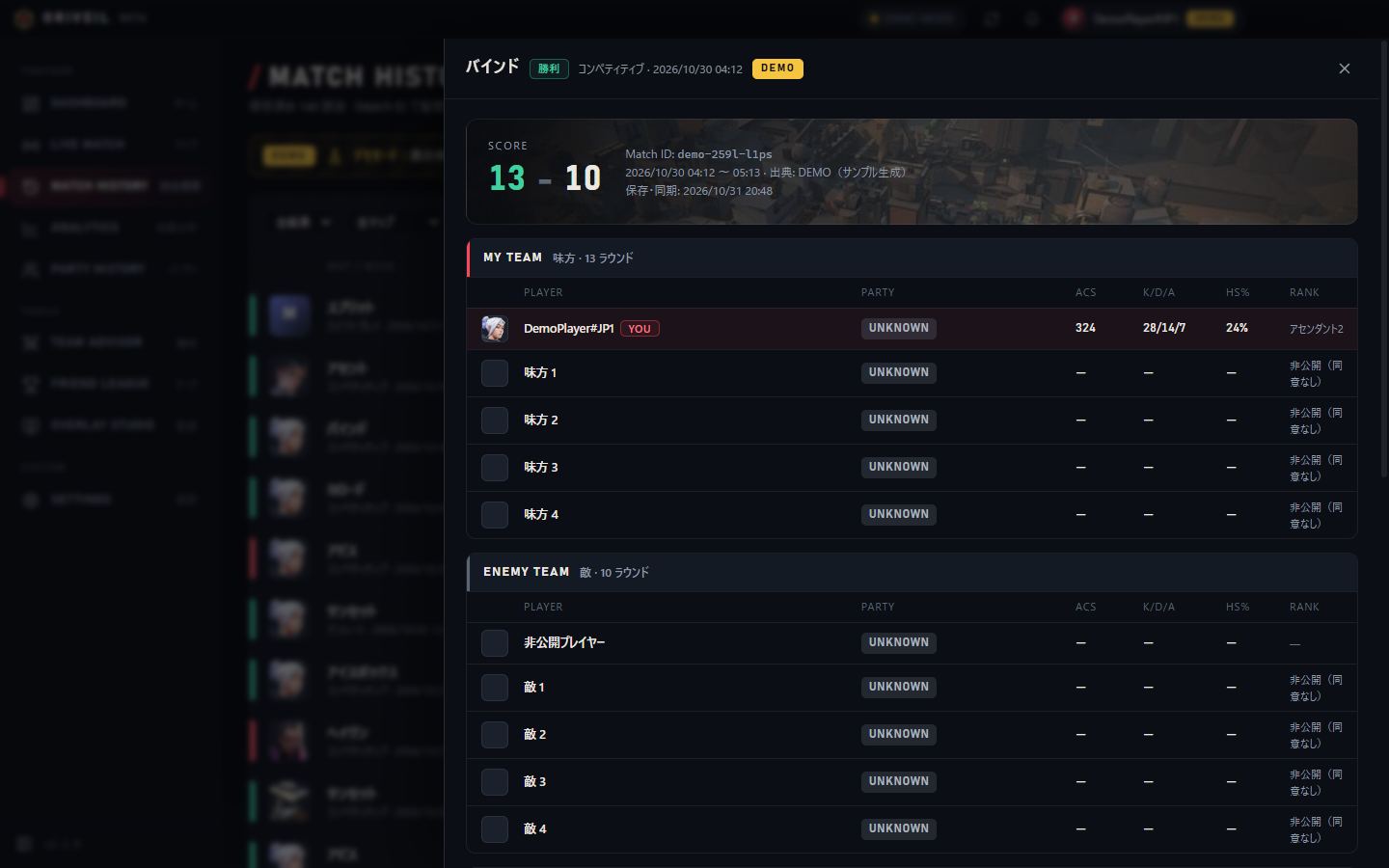
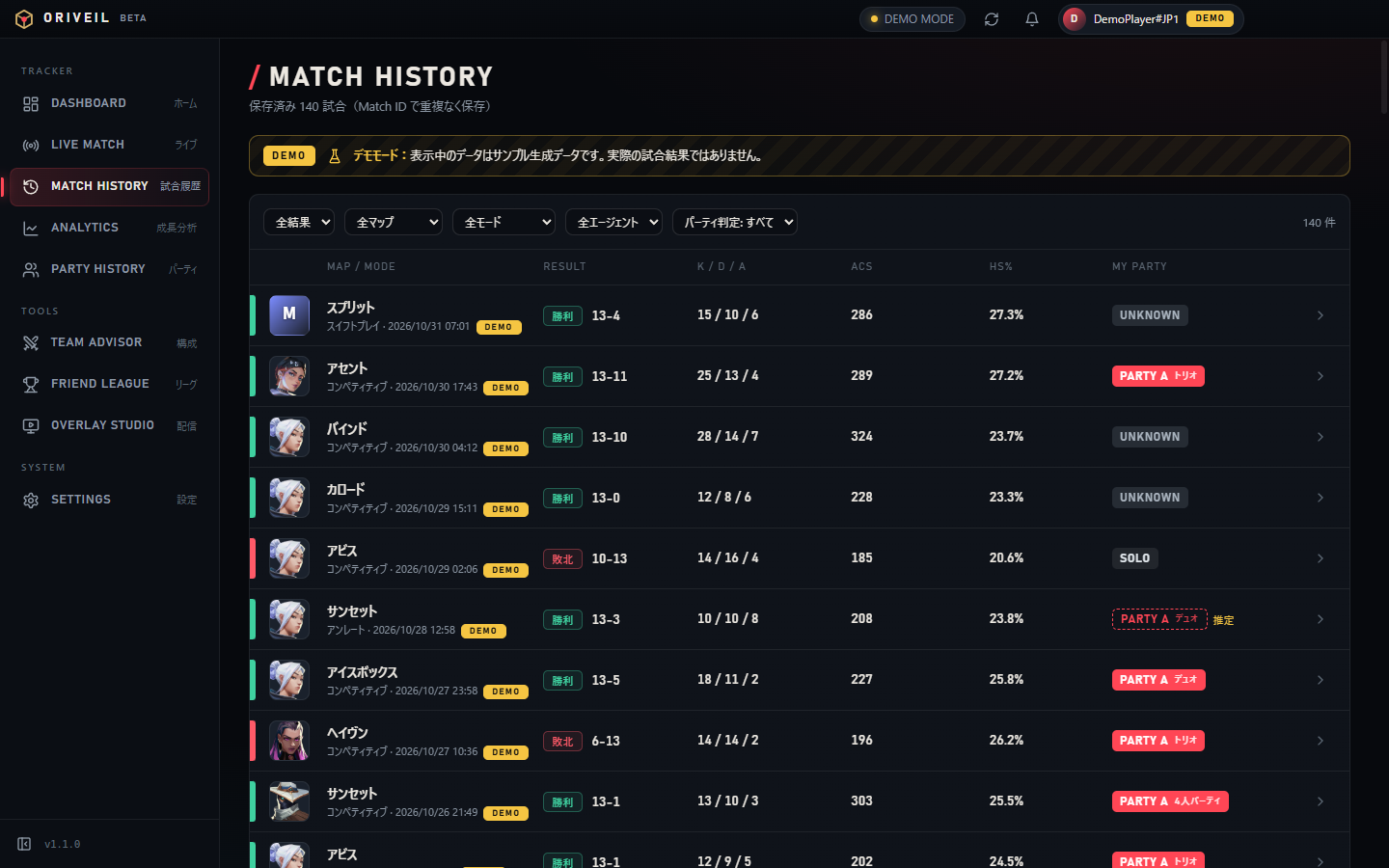
Match detail: scoreboard and party status
Match detail: scoreboard and party status · UI in Japanese · DEMO
Party history: per-match status, games with friends, rematches
Party history: per-match status, games with friends, rematches · UI in Japanese · DEMO
02

Team Advisor

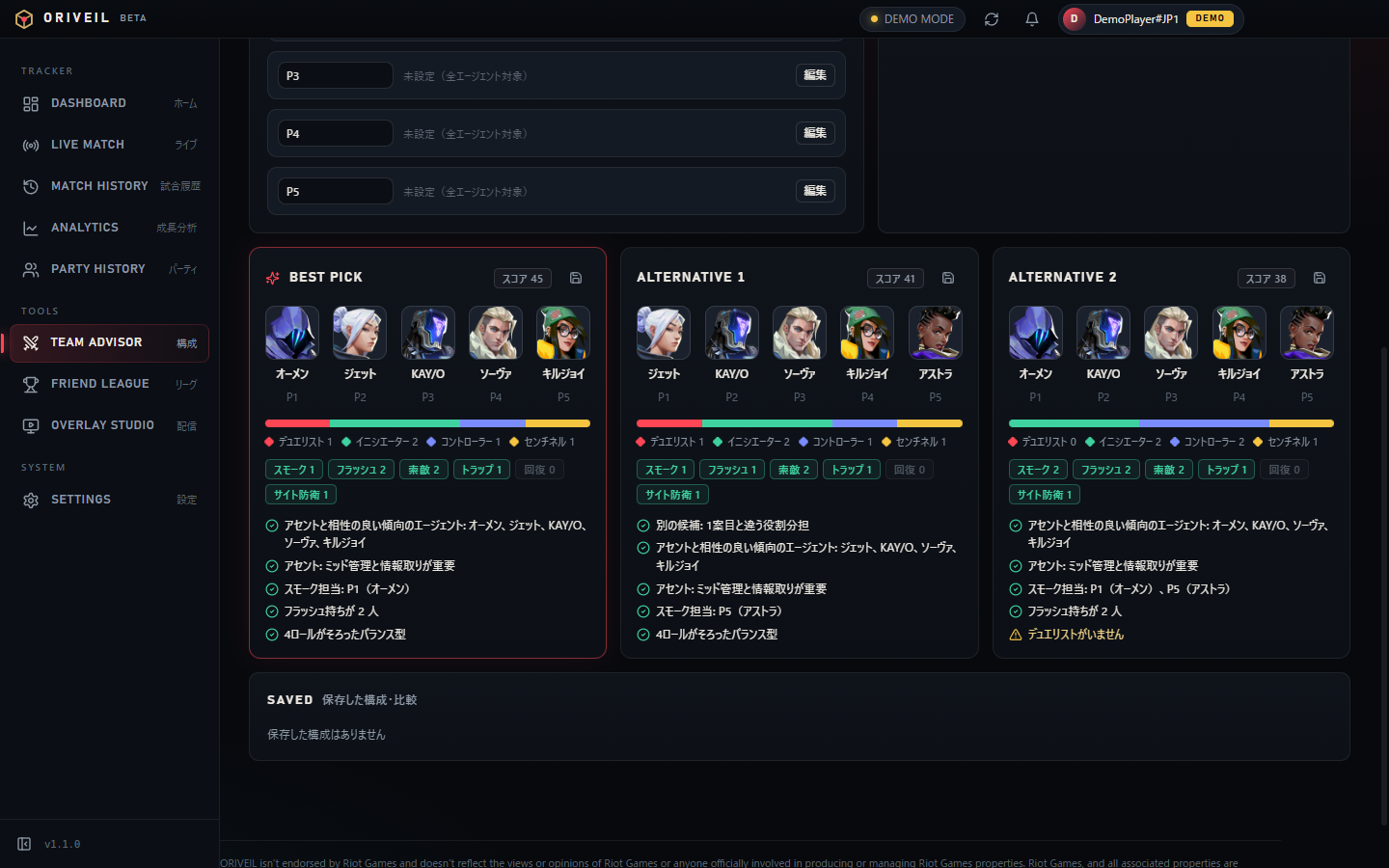
Pick a map and enter each member’s favorite / disliked agents, preferred roles and bans — the advisor suggests up to three compositions, each with reasons and warnings.

  • Role balance and utility coverage (smokes, flashes, recon …) visualized
  • 2–5 players; save compositions and compare up to three
  • Uses no opponent data — only your own team’s preferences and general map tendencies
Team Composition Advisor: suggestions with reasons and warnings
Team Composition Advisor: suggestions with reasons and warnings · UI in Japanese · DEMO
03

Friend League

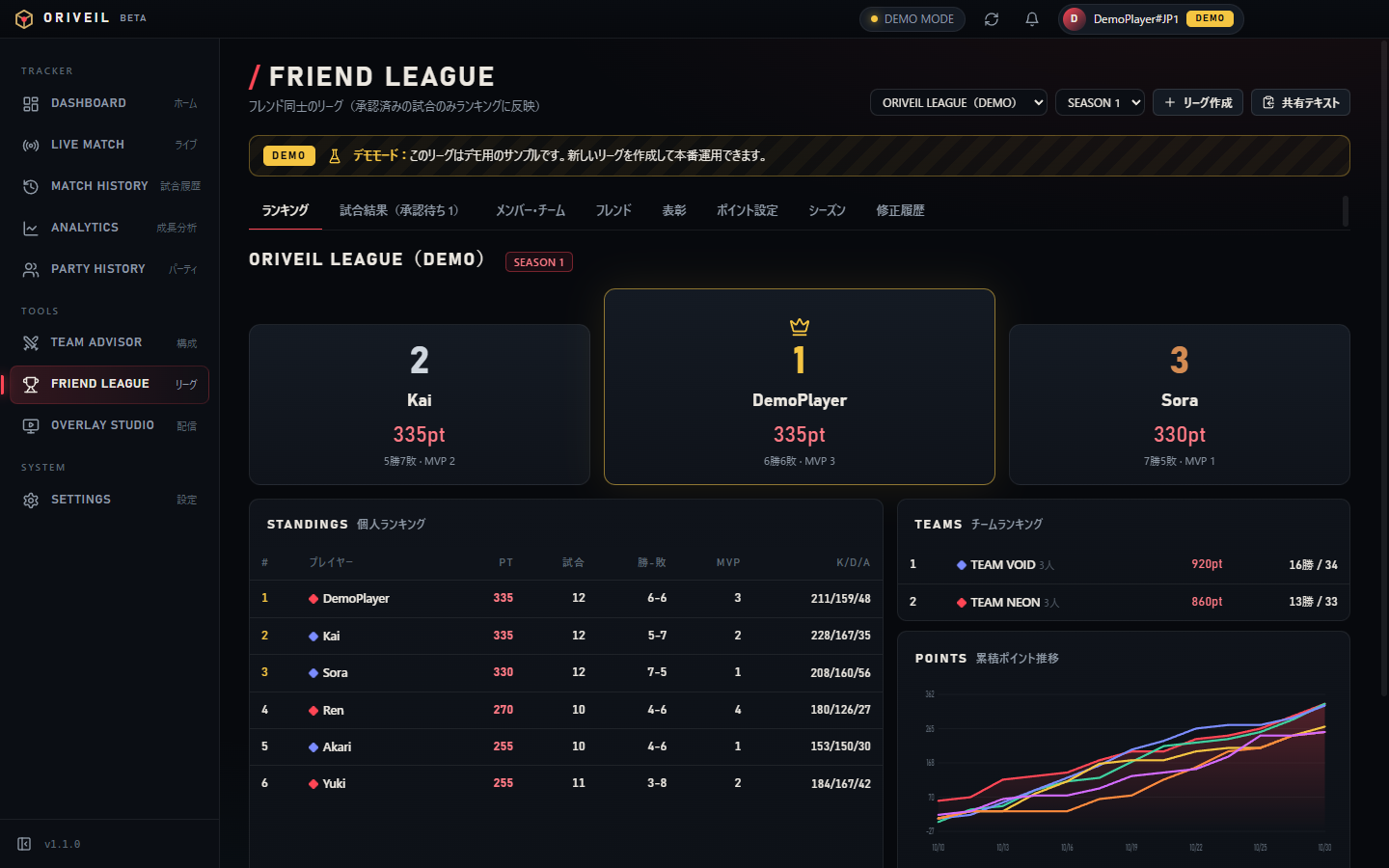
Run a private league among friends with point-based standings, teams, seasons and awards. Manual result reports count only after approval, and every change is logged.

  • Custom point rules: win, participation, MVP, kills and more
  • Approval flow and audit log: corrections require a reason; before/after values are kept
  • Share standings: copy as text or post to your own Discord webhook (only when you press the button)
Friend League: standings, teams and points timeline
Friend League: standings, teams and points timeline · UI in Japanese · DEMO
04

Overlay Studio

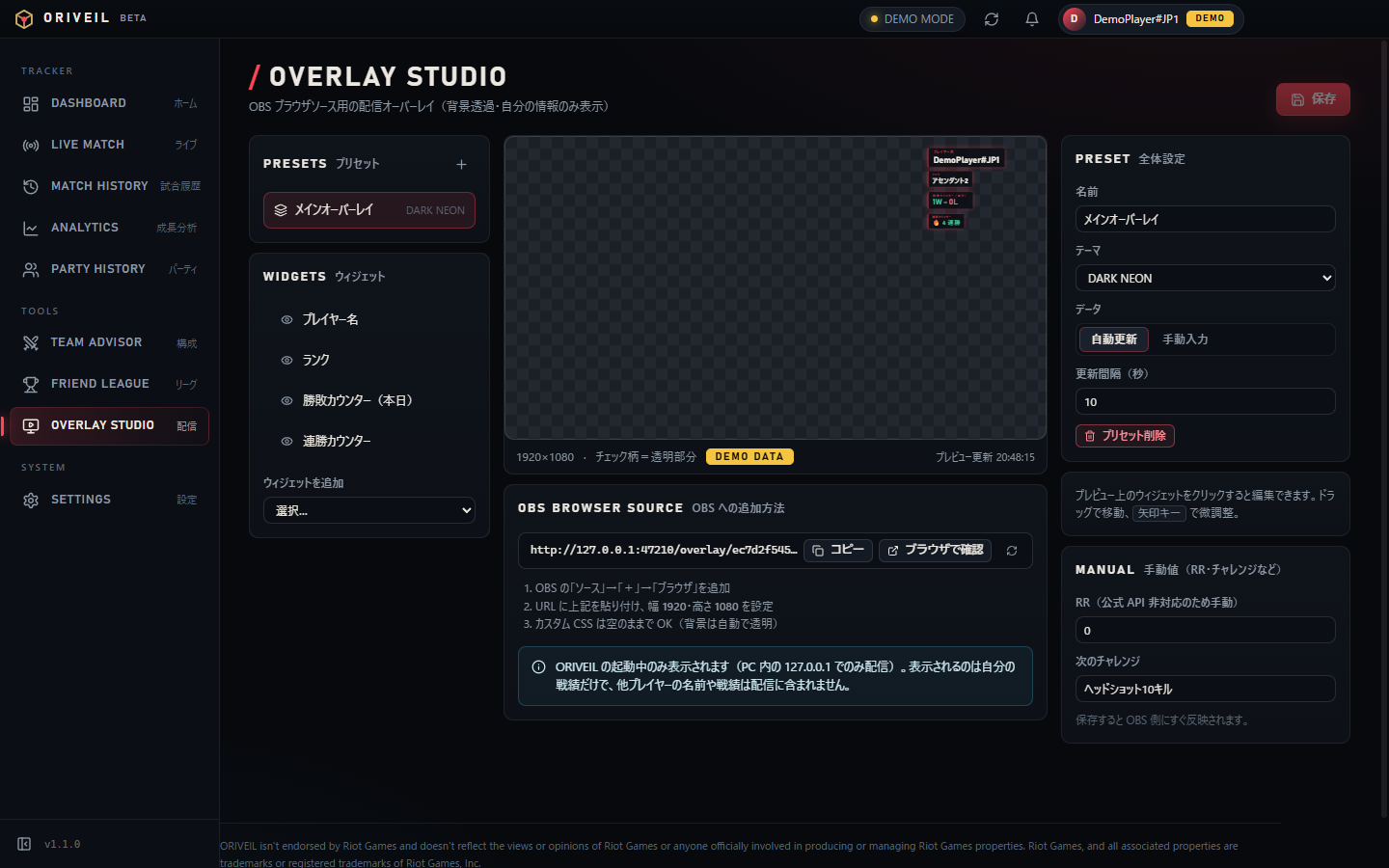
Drag widgets such as player name, rank, today’s W/L and win streak onto the canvas. Paste the generated URL into an OBS Browser Source for a transparent overlay.

  • Shows only your own information — never other players’ names or stats
  • No information that gives an in-match advantage (aggregated results and manual values only)
  • Served only on your PC (127.0.0.1) with an unguessable token URL; regenerate to revoke
Overlay Studio: drag to place widgets, paste the URL into OBS
Overlay Studio: drag to place widgets, paste the URL into OBS · UI in Japanese · DEMO
Transparency

Four levels of party status

Confirmed (official)

Official match data

Confirmed by party information included in the official match data from the Riot API (only parties that include you or a consenting friend). Available after API approval.

Confirmed (consented)

Self-report & consenting friends

Declared by you, or shared by friends you registered as consenting, via a share code.

Estimated

Statistical estimate

A likelihood computed from co-occurrence in your own match history. Capped at 90% and never treated as confirmed.

Unknown

Not enough data

No basis to decide. Never assumed to be solo. Players hidden by the game are never analyzed.

Opponents’ parties or stats are never shown before or during a match. With real Riot data, only parties that include you or a consenting friend are shown; parties made up only of players who have not opted in are never shown — neither from official data nor as estimates. Players who have not opted in are shown only with per-match anonymous labels (e.g. “Ally 1”, “Enemy 3”) and are never tracked or aggregated across matches.

User flow

How it works

  1. Install

    Run the Windows installer or the portable build. No sign-up required.

  2. Try Demo ModeAvailable now

    The app starts in Demo Mode, with sample data clearly labeled “DEMO”, so every feature can be explored.

  3. Link your Riot account (opt-in)After approval

    First, the app explains that account linking makes your player data public and asks you to opt in. Then Settings → “Sign in with Riot” opens the official Riot Sign On page; linking happens only if you allow it there. ORIVEIL never sees your password.

  4. Sync after matchesAfter approval

    Your match history is fetched from the official API and stored on your PC. When the app detects (via the Windows process list) that VALORANT has closed, it syncs about 90 seconds later; you can also sync manually. Stored matches are never re-fetched, and the app makes almost no API calls while you are not playing. No in-match data is collected.

  5. Review, plan, share

    Use analytics, party history, the advisor, the league and the overlay. Anything leaves your PC only when you choose to share it.

  6. Unlink & delete

    Settings offers “Unlink” or “Unlink and delete data”. Uninstalling or deleting the data folder removes everything.

Screenshots

Screenshots

Download

Download

ORIVEIL v1.1.1

OS
Windows 10 / 11 (64-bit)
Packages
Installer(ORIVEIL-Setup-1.1.1.exe・117 MB)
Portable(ORIVEIL-Portable-1.1.1.exe・371 MB)
Price
Free
Admin rights
Not required (per-user install)
Data
%APPDATA%\ORIVEIL
SHA-256
Installer
55292fe9683b29d6d90a7956c9c6af9892a95e6e1da78bfc2475a22f857063de
Portable
52e041f83d3812adb8101487ec1a28a9aa877a727b9618a3207cae70efe3c489
Verify with PowerShell: Get-FileHash .\ORIVEIL-Setup-1.1.1.exe -Algorithm SHA256

Before you install

  • The current builds are not code-signed, so Windows SmartScreen may warn on first launch (“More info” → “Run anyway”).
  • Riot account linking is enabled after Riot API approval. Until then the app runs in Demo Mode.
  • The app never reads game memory, intercepts traffic or uses private APIs.
FAQ

FAQ

Can I see live match data or opponent information?
No. The official Riot API does not provide live match data, and viewing opponents’ information before or during a match (scouting) is not allowed by Riot’s policies. ORIVEIL only works with your own post-match data.
Is my account safe? Do I enter my password?
You enter your password only on Riot’s own sign-in page (Riot Sign On); ORIVEIL never receives it. The app only receives access tokens, encrypted on your PC with Windows DPAPI.
Where is my data stored?
Everything is stored on your PC (%APPDATA%\ORIVEIL). The operator does not collect or store your match data on any server. See the Privacy Policy.
How accurate is the “estimated” party status?
An estimate is a likelihood based on how often players appeared on your team in your own match history. Confidence is capped at 90% and never treated as confirmed. Accuracy on real match data will be measured and published after Riot API approval.
Is it free?
Yes, it is free.
Is this an official Riot Games app?
No. ORIVEIL is an unofficial fan tool and is not endorsed by Riot Games.
Contact

Contact

For bug reports, data questions or anything about these terms, contact us by e-mail (Japanese or English).

support@oriveil.app

For questions about your Riot account or the game itself, please contact Riot Games Player Support.